Connecting AWS IAM Identity Center
Last updated: April 8, 2026
This article applies only to AWS connections created after July 2025. To check which version you’re using, look at the Domain ID under your domain:
If the domain name shows
aws-sso_ics, continue with the steps below.
If it shows
aws.amazon.com, proceed with instructions in this article.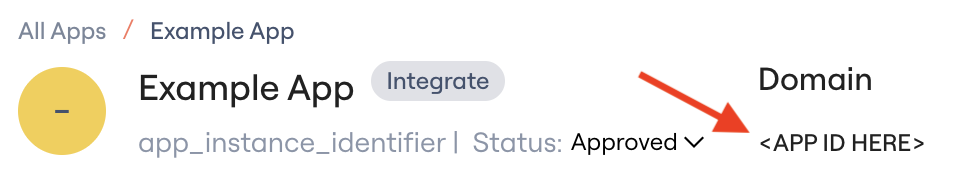
Lumos integrates with AWS IAM Identity Center to help you conduct access reviews across your AWS accounts. We surface IAM Identity Center users, the accounts they can access, and their permission sets. If SCIM is enabled, Lumos also supports automated user provisioning, otherwise provisioning and deprovisioning will occur in AWS Identity Store.
Prerequisites
You must have elevated AWS permissions for:
IAM
IAM Identity Center (SSO)
AWS Organizations
Connection Instructions
Step 1: Enable SCIM and Collect Required Values
Go to the IAM Identity Center console → Settings.
Confirm Identity source shows as External identity provider.
If not, follow these instructions.
Click Actions → Manage Provisioning:
Copy the SCIM endpoint value to the
Tenant IDfield (e.g.,Nvdk4lx216-7d1e-4759-f84a-047fj48sd370).Click Generate token → copy to the
API Keyfield.
Back on the Settings page:
Copy the IAM Identity Center ARN.
Find your AWS Region (top-right corner near your email, e.g.,
us-west-2).
Step 2: Create IAM Role for Lumos
You can create the role via AWS Console or Terraform.
Option A: AWS Console
IAM Console → Roles → Create Role.
Select Another AWS account → enter Account ID
349123981986.Enable Require external ID and enter a secure value.
Add permissions:
For simplest management, attach:
AWSSSODirectoryAdministratorAWSSSOMasterAccountAdministrator
For least privilege, use this custom policy:
{
    "Version": "2012-10-17",
    "Statement": [
      {
        "Sid": "AllowAccessToIdentityCenter",
        "Effect": "Allow",
        "Action": [
          "identitystore:ListUsers",
          "identitystore:DescribeUser",
          "identitystore:ListGroups",
          "identitystore:DescribeGroup",
          "identitystore:ListGroupMemberships",
          "identitystore:GetGroupMembershipId",
          "identitystore:CreateGroupMembership",
          "identitystore:DeleteGroupMembership",
          "identitystore:CreateUser",
          "identitystore:DeleteUser",
          "organizations:DescribeAccount",
          "organizations:ListAccounts",
          "sso:DescribePermissionSet",
          "sso:ListAccountAssignments",
          "sso:ListAccountsForProvisionedPermissionSet",
          "sso:ListPermissionSetsProvisionedToAccount",
          "sso:ListInstances",
          "sso:ListPermissionSets",
          "sso:DescribeInstance",
          "sso:DescribeAccountAssignmentDeletionStatus",
          "sso:DescribeAccountAssignmentCreationStatus",
          "sso:DeleteAccountAssignment",
          "sso:CreateAccountAssignment",
          "sso:ListAccountAssignmentsForPrincipal"
        ],
        "Resource": "*"
      },
      {
        "Sid": "AccessToSSOProvisionedRoles",
        "Effect": "Allow",
        "Action": [
          "iam:AttachRolePolicy",
          "iam:DeleteRolePolicy",
          "iam:DetachRolePolicy",
          "iam:ListAttachedRolePolicies",
          "iam:GetRole",
          "iam:CreateRole",
          "iam:DeleteRole",
          "iam:PutRolePolicy",
          "iam:UpdateRole",
          "iam:ListRolePolicies",
          "iam:UpdateRoleDescription"
        ],
        "Resource": "arn:aws:iam::*:role/aws-reserved/sso.amazonaws.com/*"
      },
      {
        "Sid": "AccessToSCIMProvider",
        "Effect": "Allow",
        "Action": [
          "iam:GetSAMLProvider"
        ],
        "Resource": "arn:aws:iam::*:saml-provider/AWSSSO_*_DO_NOT_DELETE"
      }
    ]
  }
For Read-Only, use this custom policy. Ensure that SCIM fields are left empty, as those grant write actions.
{
    "Version": "2012-10-17",
    "Statement": [
      {
        "Sid": "AllowAccessToIdentityCenter",
        "Effect": "Allow",
        "Action": [
          "identitystore:ListUsers",
          "identitystore:DescribeUser",
          "identitystore:ListGroups",
          "identitystore:DescribeGroup",
          "identitystore:ListGroupMemberships",
          "identitystore:GetGroupMembershipId",
          "organizations:DescribeAccount",
          "organizations:ListAccounts",
          "sso:DescribePermissionSet",
          "sso:ListAccountAssignments",
          "sso:ListAccountsForProvisionedPermissionSet",
          "sso:ListPermissionSetsProvisionedToAccount",
          "sso:ListInstances",
          "sso:ListPermissionSets",
          "sso:DescribeInstance",
          "sso:DescribeAccountAssignmentDeletionStatus",
          "sso:DescribeAccountAssignmentCreationStatus",
          "sso:ListAccountAssignmentsForPrincipal"
        ],
        "Resource": "*"
      },
      {
        "Sid": "AccessToSSOProvisionedRoles",
        "Effect": "Allow",
        "Action": [
          "iam:ListAttachedRolePolicies",
          "iam:GetRole",
          "iam:ListRolePolicies",
        ],
        "Resource": "arn:aws:iam::*:role/aws-reserved/sso.amazonaws.com/*"
      },
      {
        "Sid": "AccessToSCIMProvider",
        "Effect": "Allow",
        "Action": [
          "iam:GetSAMLProvider"
        ],
        "Resource": "arn:aws:iam::*:saml-provider/AWSSSO_*_DO_NOT_DELETE"
      }
    ]
  }
Edit the trust relationship:
Set
Principalto:arn:aws:iam::349123981986:user/global-service-account
The connector will use the default 1 hour session duration.
Copy the role ARN and store it securely.
[Optional] Provide either the full SCIM endpoint URL or just the tenant ID used for SCIM API calls. It can be found in the IAM Identity Center console under 'Settings' - 'Automatic provisioning' -
SCIM endpoint. You can also get there through 'Settings' - 'Identity source' tab - Actions - Manage provisioning - SCIM endpoint.You can enter the full URL (e.g., 'https://scim.us-east-1.amazonaws.com/xxxxxxxxxxx-xxxx-xxxx-xxxx-xxxx/scim/v2') or just copy the alphanumeric code from the URL (e.g., 'xxxxxxxxxxx-xxxx-xxxx-xxxx-xxxx').[Optional] Provide the SCIM API token: Authentication token for SCIM API interactions with IAM Identity Center. Generate this token in the IAM Identity Center console under 'Settings' - 'Automatic provisioning' - 'Access tokens'. Treat as a sensitive credential with appropriate security measures.
Enter all fields into Lumos.
Click Connect.
Option B: Terraform
data "aws_iam_policy" "AWSSSODirectoryAdministrator" {
  arn = "arn:aws:iam::aws:policy/AWSSSODirectoryAdministrator"
}

data "aws_iam_policy" "AWSSSOMasterAccountAdministrator" {
  arn = "arn:aws:iam::aws:policy/AWSSSOMasterAccountAdministrator"
}

resource "aws_iam_role" "lumos_identity_center_role" {
  name = "LumosIdentityCenterIntegrationRole"
  max_session_duration = 43200

  assume_role_policy = jsonencode({
    Version = "2012-10-17",
    Statement = [{
      Action = "sts:AssumeRole",
      Effect = "Allow",
      Principal = {
        AWS = "arn:aws:iam::349123981986:user/global-service-account"
      },
      Condition = {
        StringEquals = {
          "sts:ExternalId" = "CHOOSE_YOUR_EXTERNAL_ID"
        }
      }
    }]
  })
}

resource "aws_iam_role_policy_attachment" "directory_admin" {
  role       = aws_iam_role.lumos_identity_center_role.name
  policy_arn = data.aws_iam_policy.AWSSSODirectoryAdministrator.arn
}

resource "aws_iam_role_policy_attachment" "master_admin" {
  role       = aws_iam_role.lumos_identity_center_role.name
  policy_arn = data.aws_iam_policy.AWSSSOMasterAccountAdministrator.arn
}
Provisioning Capabilities
Functionality | Type | Sync | Provision | Description |
Users | Account | ✅ | ✅ | User account records |
AWS Accounts | Permission | ✅ | ❌ | Accounts under the organization |
Permission Sets | Permission | ✅ | ✅ | Permission sets |
Groups | Permission | ✅ | ✅ | Groups |
AppStore | Offboarding | Access Reviews | License Management |
✅ | ✅ | ✅ | ✅ |
Deprovisioning Action | Type | Description |
Deactivate | User | Deactivate a user in Identity Center, based on SCIM / Identity Store. |
Delete | User | Delete a user in Identity Center, based on SCIM / Identity Store |
API Operations Used
This integration uses a combination of AWS SDK (boto3) operations and SCIM HTTP endpoints to interact with AWS IAM Identity Center.
AWS SDK Operations (boto3)
The connector uses multiple AWS services through the boto3 SDK.
AWS STS (Security Token Service)
| Assumes the customer's service role with External ID for cross-account access (uses default 1 hour session duration) |
AWS Identity Store
| Lists all users in the Identity Store | |
| Lists all groups in the Identity Store | |
| Lists memberships for a specific group | |
| Retrieves the membership ID for a user in a group (used for deletion) | |
| Creates a new user in the Identity Store | |
| Permanently deletes a user from the Identity Store | |
| Updates user attributes (username, display name, email, etc.) | |
| Adds a user to a group | |
| Removes a user from a group |
AWS SSO Admin
| Retrieves the Identity Center instance and Identity Store ID | |
| Lists all permission sets in the Identity Center instance | |
| Retrieves details about a specific permission set | |
| Lists AWS accounts where a permission set is provisioned | |
| Lists account assignments (users/groups assigned to permission sets on specific accounts) | |
| Assigns a permission set to a user on a specific AWS account (asynchronous operation) | |
| Removes a permission set assignment from a user on a specific AWS account (asynchronous operation) | |
| Checks the status of an asynchronous account assignment creation operation | |
| Checks the status of an asynchronous account assignment deletion operation |
AWS Organizations
| Lists all AWS accounts in the organization |
SCIM HTTP Endpoints
Base URL Format: https://scim.{region}.amazonaws.com/{tenant_id}/scim/v2/
SCIM endpoints are optional but required for user activation/deactivation and custom enterprise attributes.
|
| Retrieves a specific user by ID (includes status and enterprise attributes) | |
|
| Creates a new user with optional enterprise attributes | |
|
| Updates user attributes, activates, or deactivates a user | |
|
| Permanently deletes a user |
SCIM Enterprise Extension Attributes Supported:
- employeeNumber
- costCenter
- organization
- division
- department
- manager (reference to another user ID)
Authentication: SCIM endpoints use Bearer token authentication configured during SCIM setup in IAM Identity Center.
Important Notes
AWS Region: All operations are performed in the configured AWS region specified during setup.
Authentication Flow:
1. Initial AWS credentials authenticate to STS
2. STS AssumeRole creates temporary credentials (uses default 1 hour session duration)
3. Temporary credentials used for Identity Store, SSO Admin, and Organizations operations
4. SCIM endpoints use separate Bearer token authentication
Asynchronous Operations:
- Account assignment creation and deletion are asynchronous
- Waits 60 seconds, then checks the operation status once. Operations may complete successfully even if the check finds them still in progress.
- Operations may complete successfully even if polling times out
Parallel Processing:
- The connector uses ThreadPoolExecutor for parallel boto3 calls
- Group memberships and account assignments are fetched in parallel (max 10 workers)
- This significantly improves sync performance for large organizations
Documentation Links:
- AWS Identity Store API Reference
- AWS SSO Admin API Reference
- AWS Organizations API Reference
- AWS STS API Reference
- AWS SCIM Protocol Documentation
Troubleshooting
"Access Denied" when assuming role
Solutions:
- Verify Service Role ARN is correct
- Check External ID matches trust policy exactly
- Confirm Lumos account (349123981986) is trusted
- Verify role exists and is not deleted
"Instance not found" error
What this means:
Identity Center ARN is incorrect or instance doesn't exist.
Solution:
- Verify Identity Center is enabled
- Check ARN format: arn:aws:sso:::instance/ins-{id}
- Ensure ARN copied from Settings → Instance ARN
SCIM operations failing
Possible causes:
- SCIM not configured
- SCIM token expired or invalid
- SCIM identifier incorrect
Solution:
- Verify SCIM is enabled in Identity Center settings
- Regenerate SCIM access token
- Check SCIM identifier matches tenant ID from endpoint URL
- Test SCIM endpoint accessibility
Permission set assignment timeout
What this means:
Account assignment operation didn't complete within 60 seconds.
Solution:
- This is normal for first-time assignments
- Check AWS console for assignment status
- Assignment may complete successfully despite timeout
- Retry if assignment didn't succeed
"Insufficient permissions" errors
What this means:
Service role missing required permissions.
Solution:
- Review custom policy includes all required permissions
- Check Identity Store permissions
- Verify SSO Admin permissions
- Confirm Organizations read access
FAQ:
I add the scim token to AWS, will lumos deprovision all users in AWS since our IdP has scim integration?
Short answer: No, adding the Lumos SCIM token does not automatically deprovision all existing users in AWS Identity Center. Simply connecting Lumos with the SCIM token enables Lumos to perform provisioning and deprovisioning actions going forward, but Lumos will not immediately delete or suspend every user that was previously provisioned by IdP.
That said, AWS Identity Center supports only one active SCIM provisioning source at a time, because the SCIM token represents the system of record for lifecycle operations. So the key risk is not that Lumos will mass-remove users on connection, but that you need to transition ownership carefully so AWS does not interpret the change in provisioning source as a signal to remove accounts.
What happens when you switch SCIM from IdP to Lumos?
When you generate a new SCIM token in AWS Identity Center and provide it to Lumos, Lumos gains the ability to:
Read IAM Identity Center users and permission sets
Provision new users
Suspend or deprovision users when directed through Lumos workflows
Manage access assignments
Lumos does not run a destructive “reset” on initial connection. Deprovisioning only occurs when an explicit Lumos-driven lifecycle event happens (for example, a user is marked inactive or removed through an access policy or offboarding workflow).
Recommended transition approach (IdP → Lumos)
To safely migrate SCIM provisioning responsibility, we recommend the following sequence:
1. Disable SCIM provisioning in IdP first: This prevents IdP from continuing to push updates or interpreting Lumos-managed users as out of sync.
2. Do not delete users in AWS Identity Center: Existing users can remain in place — Lumos will map and manage them going forward.
3. Generate a new SCIM access token in AWS Identity Center
In the AWS console: Settings → Manage Provisioning → Generate token
4. Connect Lumos using the SCIM endpoint + token: Lumos requires both the SCIM tenant identifier and the SCIM token for provisioning operations.
5. Validate LCM in a staged way: After you've connected, and you're considering testing the LCM policies, we recommend starting with a small pilot group of users to confirm lifecycle behavior before expanding coverage.
Can I use the same SCIM token in Okta and Lumos for AWS?
No, AWS's SCIM token can only be used by one service. If breaking this flow is dangerous, connect without SCIM. Note, Okta can be used for SSO while Lumos is used for SCIM.