Connecting Salesforce
Last updated: March 30, 2026
This article applies only to Salesforce connections created after July 2025. To check which version you’re using, look at the Domain ID under your domain:
If the domain name shows
salesforce_ics, continue with the steps below.
If it shows
salesforce.com, proceed with instructions in this article.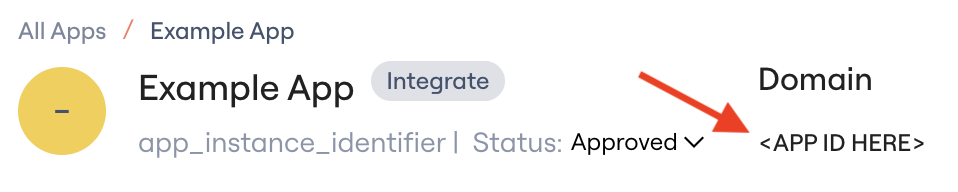
After this article...
You'll be able to connect the Salesforce integration to Lumos and resolve common issues that arise when connecting.
Required plan & roles
There's no minimum plan required to connect the Salesforce integration.
This integration supports full provisioning, however certain permissions can be scoped to read-only to limit control over what Lumos can do:
Modify All Data -> View All Profiles + View All Users
Note: Modifying this will disable account creation and entitlement assignment in Lumos.
Your Salesforce user needs the following permissions to connect the integration.
API Enabled
Manage Package Licenses
Customize Application
Modify All Data (for Provisioning)
If Modify All Data is not provided:
Manage Connected Applications
View All Profiles
View All Users
Manage Profile and Permission Sets
For Sandbox instances:
PermissionsManageUser
PermissionsViewAllUsers
Where to enable these permissions (Salesforce admin UI):
Option A (Profile): Setup -> Users -> Profiles -> select the user's Profile -> Edit -> Administrative Permissions / System Permissions
Option B (Permission Set): Setup -> Users -> Permission Sets -> select/create a Permission Set -> System Permissions
If you want to use Lumos to provision access to Salesforce profiles or permission sets, then Modify All Data is required.
If you are connecting a Salesforce sandbox instance, PermissionsManageUsers and PermissionsViewAllUsers are required to pull user entitlements
Instructions
1. Find the Salesforce card in your Lumos integrations (Reconnect or add new)
2. Log into your production Salesforce tenant and accept the requested scopes to complete the connection.
Capabilities
Functionality | Type | Sync | Provision | Description |
Users | Account | ✅ | ✅ | User account |
Profiles | Permission | ✅ | ✅ (Note, these can only be assigned as a user must always have exactly one profile) | |
Roles | Permission | ✅ | ✅ | Roles |
Permission Sets | Permission | ✅ | ✅ | |
Package Licenses | Permission | ✅ | ✅ | |
Permission Set Groups | Permission | ✅ | ✅ | Permission Set Groups |
Public Groups | Permission | ✅ | ❌ | Public Groups |
Deprovisioning Action | Type | Description |
Deactivate | User | Deactivate a user in Salesforce, deletion is not supported |
Release | User | Remove all permission sets from the user |
Transfer | User | Transfer ownership of Accounts, Tasks and Opportunities |
Activity Tracking
Status: Supported
This integration will sync user last activity timestamps from Salesforce.
API Endpoints Used
Base URL: https://{subdomain}.my.salesforce.com
The Salesforce connector uses API version v63.0 for all REST API and SOQL operations.
OAuth 2.0 Endpoints
Authorization URLs (vary by environment):
- Production: https://login.salesforce.com/services/oauth2/authorize
- Sandbox: https://test.salesforce.com/services/oauth2/authorize
- Custom Domain: https://{subdomain}.my.salesforce.com/services/oauth2/authorize
Token URLs:
- Production: https://login.salesforce.com/services/oauth2/token
- Sandbox: https://test.salesforce.com/services/oauth2/token
- Custom Domain: https://{subdomain}.my.salesforce.com/services/oauth2/token
REST API Endpoints
GET | Execute SOQL queries to fetch users, roles, profiles, permission sets, and licenses | |
POST | Batch update operations for transferring sObject ownership | |
GET | Retrieve individual user records | |
PATCH | Update user attributes (email, name, custom fields) | |
GET | Retrieve user object schema and custom attribute definitions | |
POST | Assign package licenses to users | |
DELETE | Unassign package licenses from users | |
PATCH | Update sObject records (used for data transfer) |
SCIM 2.0 Endpoints
Base URL: https://{subdomain}.my.salesforce.com/services/scim/v2
GET | List all users with entitlement associations (profiles, permission sets, roles) | |
GET | Get individual user with entitlements and SCIM attributes | |
POST | Create new user accounts | |
PATCH | Update user status (activate/deactivate), assign/unassign roles, update SCIM attributes | |
PATCH | Assign or unassign permission sets and profiles from users |
SOQL Queries Used
The connector executes the following SOQL queries through the /services/data/v63.0/query endpoint:
User Data:
- SELECT Id, Email, Username, FirstName, LastName, IsActive, LastLoginDate, UserRoleId, ProfileId FROM User
- SELECT Id, Name, LastLoginDate FROM User WHERE Id IN (...) - Fetch last login dates for specific users
- SELECT Id, Name, Profile.Name, Profile.UserLicense.Name FROM User - Fetch license associations
Entitlements:
- SELECT Id, Name, DeveloperName, Description FROM UserRole - Fetch roles
- SELECT Id, Name, Description, UserLicenseId FROM Profile - Fetch profiles
- SELECT Id, Name, Label, Type, Description FROM PermissionSet - Fetch permission sets
- SELECT Id, AssigneeId, PermissionSetId FROM PermissionSetAssignment - Fetch permission set assignments
- SELECT Id, Name, Status, MasterLabel FROM UserLicense - Fetch licenses
- SELECT Id, PackageLicenseId, UserId FROM UserPackageLicense - Fetch package license assignments
Organization:
- SELECT Id, Name FROM Organization - Fetch organization details for validation
Data Transfer:
- SELECT OwnerId, Id FROM {sobject} WHERE OwnerId='{owner_id}' - Fetch sObjects (Accounts, Tasks, Opportunities) for ownership transfer
Note: SCIM endpoints require SCIM to be enabled in your Salesforce instance. Most Salesforce editions support SCIM, but sandbox environments may have limited functionality.
Troubleshooting
I can't connect the Salesforce integration
Make sure that your Salesforce user has the required permissions and that you're logged into the correct Salesforce environment.
Check that you have entered the correct value for the Salesforce subdomain, if your subdomain includes multiple dashes, input the whole subdomain up until the
my.salesforce.comdomain.
The Salesforce integration connected for Sandbox but isn't showing any users or permissions
Make sure that the url provided follows the format specified in the instructions. Copying over the url may sometimes shorten the "--" to just one "-", which will lead to an incorrect value.